
What Is an Interactive Learning Floor? A Plain-Language Guide for Educators
If you have seen the phrase interactive learning floor and were not entirely sure what it meant, you are not alone. It is one of those terms that sounds self-explanatory until you actually try to picture it working inside a real classroom. This guide explains what an interactive floor system is, how it works, and what educators should know before deciding whether one is right for their school.
The Basic Concept
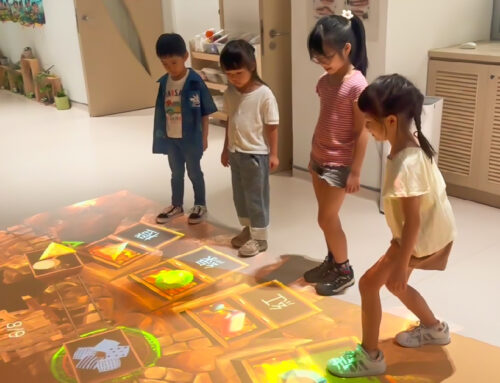
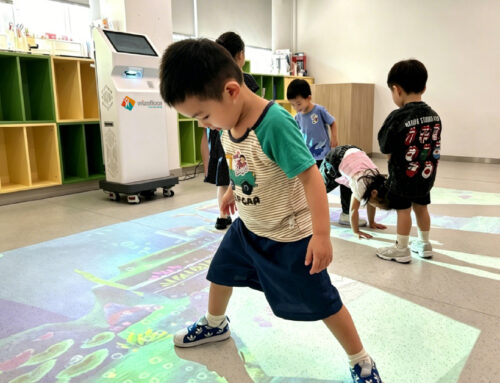
An interactive learning floor is a system that projects digital content, including games, activities, maps, and curriculum problems, directly onto the floor of a room, and responds to the physical movements of the people standing on it. When a student steps on a projected answer, walks through a designated zone, or stamps on a highlighted area, the system detects that movement and responds accordingly. The floor becomes an active learning surface rather than just the thing you walk across to get to your seat.
The technology behind this involves two main components working together: a projector that throws images downward onto the floor, and a sensing system that detects where people are and what they are doing on that projected surface.
How the Technology Works
Different interactive floor systems use different sensing approaches. WizeFloor Ultra uses LiDAR, which stands for Light Detection and Ranging. LiDAR works by emitting light pulses and measuring the time it takes for those pulses to bounce back. This allows the system to generate a precise, real-time map of the floor space and identify exactly where students are positioned and how they are moving.
LiDAR has a practical advantage in classroom environments: it performs consistently across different lighting conditions. Because it measures distance rather than colour or contrast, it is not confused by bright sunlight through a window, by dark floor surfaces, or by students wearing particular colours. In the varied environments of real school buildings, that consistency is valuable.
The projector displays the content on the floor, the LiDAR sensor reads where students are, and the software connects those two data streams to produce an interactive experience. When a student steps on the number seven in a maths activity, the software registers that choice and responds, either confirming the answer, presenting the next challenge, or providing a prompt to try again.
What This Looks Like in a Real Classroom
Picture a Year 2 maths lesson on number bonds to ten. The teacher selects a number bonds activity from the content library. Numbers appear projected on the floor in different zones. Students are asked to find two numbers that add to ten and step on them in sequence.
Every student is moving. Every student is making decisions. There is no hand-raising, no waiting to be called on, and no student sitting passively at the back while someone else uses the technology. The feedback is immediate, and the activity moves at a pace that keeps everyone engaged.
Now consider the same hardware running an English phonics lesson, a geography activity where students walk across a projected map to locate countries, or a therapy activity for a child with sensory needs in a quiet support room. The unit stays the same. The content adapts to the learning objective.
How Interactive Floors Relate to Smart Boards and Tablets
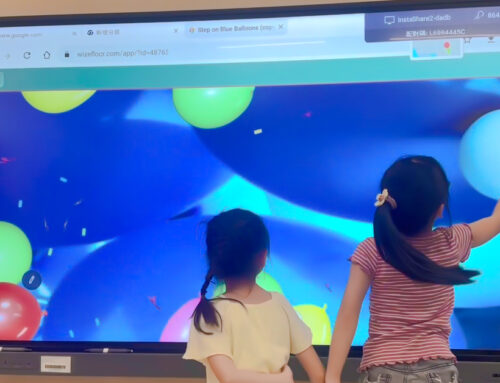
Smart board systems and interactive display panels are outstanding tools for what they do. They bring high-quality visual instruction to the front of the room, support teacher demonstrations, enable collaborative annotation, and connect students to rich digital content through a large, touch-sensitive display. Tablets give individual students their own interactive screen for personalised tasks and self-paced learning.
Interactive floors add a third dimension to this picture. The floor is a shared space that every student already occupies, which makes it fundamentally different from any forward-facing display or individual device. Rather than replacing the tools already in the room, this technology extends what a learning environment can do. Schools that use smart boards alongside an interactive floor find that the two serve different phases of a lesson naturally: the display for introduction and consolidation, the floor for application and active participation.
Research consistently shows that active, physical engagement improves learning retention compared to passive observation. An interactive floor changes the cognitive and physical experience of being in the lesson, not just the visual presentation of it.
What Educators Should Consider
If you are evaluating an interactive learning floor for your school, a few practical questions are worth asking. First, what content is available, and does it align with your curriculum? A system with many activities is only as useful as the relevance of those activities to the lessons you teach. Second, how portable is the system? A unit that requires dedicated installation is a very different practical proposition from one that travels between rooms. Third, what does teacher training look like? The best hardware underperforms when educators lack confidence using it.
WizeFloor's answers to all three of these questions, covering curriculum-aligned content for Asian school systems, a portable self-contained unit, and a structured three-tier certification programme for educators, reflect a design philosophy that takes classroom reality seriously.